How to Write SEO-Friendly Blog Posts: 20 Proven Tips for Better Rankings 💪
It is easy to write blog post but when it comes to write an SEO friendly that appear on google search console is totally different job.
This guide provides step-by-step explanation about writing SEO friendly blog posts.
What is an SEO-Friendly Blog Post?
An SEO-friendly blog post helps search engines understand your content and show it to readers.
Table of Contents
Why SEO-Friendly Writing is Important
SEO-friendly writing is important because it acts as a bridge between your content and your audience. Without SEO, no matter how good article you have written, it will remain invisible to readers.
The three main reasons it’s essential are:
Visibility & Traffic: SEO helps search engines understand your topic so that your content can be ranked and organic (free) visitors can be provided.
User Experience: SEO writing focuses on clarity, structured headings, and answering specific questions, which makes your blog easier and more enjoyable to read.
Long-Term Authority: Unlike a social media post that disappears in hours, an SEO-optimized post can provide a steady stream of traffic for months or even years.
Essentially, SEO gets people to the door, and good writing keeps them inside.

1. Keyword research is crucial. There are various online tools are available on the internet for keyword research. For instance Google Keyword Planner, Semrush, Ahrefs and more.
2. Ensure readers reading your article are receiving accurate and relevant information. Reader should get full satisfaction after reading the article so whatever information is being provided to the reader must be genuine, accurate and relevant.
3. Ensure the language of the article is easy to read. Easy means whatever written in the article should be understood by the reader. If you are using fancy text or hard vocab or of it is not interesting then it may be possible that reader will switch to some other website for the same information.
Writing SEO-friendly articles helps you in :
1. Get More Visitors 👨👩👧👦
SEO friendly article means your article is as per google rules and regulations so when your article appears in search results, more people will visit your website.
2. Improve Website Ranking🏆
Better SEO improves your position on search engines. This means you can get more number of visitors to read the article. Good ranking also build the good image of the website among users.
3. Build Trust🫂
Quality articles make readers trust your website. Why would anyone read the article if not get the desired information after so much of reading. But how anyone define the quality article? The anwer is : “A quality article is clear, well-structured, informative, engaging, and accurate”. When you have all four of those points in the article then the article will rank on google search engine and build trust among the users.
4. Long-Term Traffic 🚦
SEO articles can bring traffic for years. When you start getting enough visitors, improved rank and built trust among users then long-term traffic can easily be achieved because people won’t like to go to any other place for information once they get value on your site.
Here are the 20 Steps for good quality SEO friendly blog –
Step 1. Choose the Right Topic
The first step is choosing a topic people are searching for.
Good blog topics:
Solve problems
Answer questions
Teach something
Provide useful information
Examples:
What is SEO
How AI Works
Blogging Tips for Beginners
Choose topics that match your website. While creating a blog post if you keep in mind all the point written above in your blog posts can become a gem for most of the visitors. People face difficulties in their daily work and the only source comes in their mind is google.com. They just type their queries in google search engine and they get huge amount of responses in the form of relevant webpage hyperlinks. So, people without hitting the next page button just click on the link which is on the first page of the google.com. This is the reason why developers are focusing more on ranking on the first page of the google search engine and this can only be possible through SEO (Search Engine Optimization). So, sooner or late one has learn about SEO to rank their web page on the first page of google.com.
Step 2. Keyword Research
Keywords are the words people type into search engines.
Example:
Instead of writing:
“Blog Writing Tips”
You can write:
“How to Write SEO-Friendly Blog Posts”
This is more specific.
You can find keywords using tools like:
Google Keyword Planner
Ubersuggest
Tips for Choosing Keywords
Choose keywords:
With good search volume
Low competition
Relevant to your blog
Step 3: Write an Attractive Title
Your title is the first thing readers see.
A good title should be:
Clear
Interesting
Keyword-based
Examples
Bad title:
Blog Writing
Good title:
How to Write SEO-Friendly Blog Posts (Step-by-Step Guide)
Tips:
Use numbers
Use power words
Keep it simple
Step 4: Write a Strong Introduction
The introduction should grab the reader’s attention.
Tell readers:
What they will learn
Why it is important
Example:
If you want your blog to appear on Google and get more visitors, you must learn how to write SEO-friendly blog posts.
Keep introduction simple and friendly.
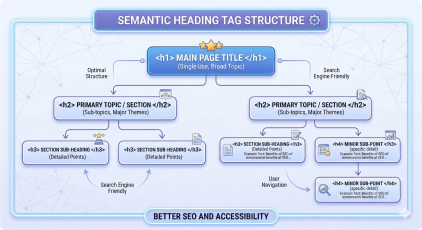
Step 5: Use Proper Headings
Headings make your article easy to read.
Use:
H1 – Title
H2 – Main headings
H3 – Subheadings
Example:
H2: Keyword Research
H3: Free Tools
Benefits:
Easy reading
Better SEO
Organized content
Step 6: Write Quality Content
Content is the most important part.
Search engines prefer:
Helpful content
Original content
Clear content
Avoid:
Copying content
Very short articles
Confusing writing
Write for Humans First
Always write for people, not just search engines.
Ask yourself:
Is this helpful?
Is this clear?
Is this interesting?
Step 7: Use Keywords Naturally
Your post can be optimized using more number of keywords instead of only one keyword and attract more traffic. However, it is good to use limited number of keywords for the post instead of adding more number of unnecessary keywords.
Do not repeat keywords too much.
Bad example:
SEO blog writing is best SEO blog writing method for SEO blog writing success.
Good example:
Learning SEO blog writing helps your website grow and attract more visitors.
Use keywords:
In title
In headings
In introduction
In conclusion
But naturally.
Step 8: Write Short Paragraphs
Short paragraphs are easier to read.
Good paragraph:
SEO writing helps your website grow. It improves ranking and increases traffic.
Bad paragraph:
SEO writing helps your website grow because it improves ranking and increases traffic and makes your website better and helps search engines understand your content easily.
Keep paragraphs:
2–4 lines
Step 9: Use Bullet Points
Bullet points improve readability.
Example:
SEO blog posts should include:
Keywords
Headings
Images
Links
Good structure
Readers like easy content.
Step 10: Add Images
Images make articles interesting.
Images help:
Better understanding
More engagement
Better SEO
Add:
Screenshots
Diagrams
Charts
Always add:
Alt text
Title
Caption
Step 11: Internal Linking
Internal links connect your blog posts.
Example:
If you wrote about:
SEO tips
AI
Blogging
Link them together.
Benefits:
Better SEO
More page views
Easy navigation
Step 12: External Linking
External links improve credibility.
Link to trusted websites like:
Wikipedia
Google
Benefits:
Trust
Better SEO
Step 13: Optimize URL (Slug)
Good URL:
Bad URL:
Tips:
Short URL
Keyword included
Easy to read
Example slug:
seo-friendly-blog-post
Step 14: Write Meta Description
Meta description appears in search results.
Example:
Learn how to write SEO-friendly blog posts with simple steps. This beginner guide will help you improve your blog ranking.
Tips:
150–160 characters
Include keywords
Make it interesting
Step 15: Improve Readability
Your article should be easy to read.
Tips:
Simple English
Short sentences
Clear ideas
Avoid:
Difficult words
Long sentences
Remember:
Simple writing is powerful writing.
Step 16: Mobile-Friendly Content
Most people use mobile phones.
Your blog should:
Load fast
Look good on mobile
Be easy to read
Mobile-friendly websites rank better.
Step 17: Check Errors
Always check:
Spelling
Grammar
Formatting
Mistakes reduce quality.
Before publishing:
Read your article again.
Step 18: Update Old Posts
SEO is not one-time work.
Update posts:
Add new information
Fix errors
Improve content
Updated posts rank better.
Before publishing:
Read your article again.
Step 19: Use SEO Tools
SEO tools help improve articles.
Popular tools:
Google Search Console
Yoast SEO
Ubersuggest
These tools help you:
Find errors
Improve SEO
Track performance
Step 20: Be Consistent
Consistency is very important.
Do not stop blogging.
Even:
1 article per month is good
Regular writing improves results.
Things to remember before publishing your article on the internet –
1. Master Your Keyword Research
Don’t just guess what people are typing. Use tools like Ahrefs, SEMrush, or Google Keyword Planner.
Primary Keyword: Find one main phrase with decent volume.
LSI Keywords: Find related terms (e.g., if your topic is “SEO blog post,” related terms are “search engine optimization,” “readability,” and “backlinks”).
Search Intent: Ensure your content matches what the user wants (e.g., are they looking for a tutorial or a product?).
2. Craft a High-CTR Title and URL
Your headline is the first thing both Google and users see.
H1 Tag: Your title must be wrapped in an
<h1>tag and include your primary keyword near the beginning.Slug: Keep your URL short and descriptive (e.g.,
yoursite.com/seo-friendly-blog-steps/instead ofyoursite.com/post-id-123/).
3. Structure with Header Tags (H2 & H3)
Search engines use headers to understand the hierarchy of your post.
Use H2s for main sections.
Use H3s for sub-points within those sections.
Benefit: This makes your post “scannable” for readers who don’t want to read a wall of text.
4. Optimize for the "Featured Snippet"
Google often shows a summary at the very top of the search results.
The Answer Box: Provide a clear, 40-60 word answer to the main question early in your post.
Bulleted Lists: Use lists (like this one!) for steps or tips; Google loves pulling these into snippets.
5. Interlink Like a Pro
Internal Links: Link to 2-3 of your own past blog posts. This keeps users on your site longer.
External Links: Link to 1-2 high-authority outside sources (like Wikipedia or a major news site). It shows Google you’ve done your research.
6. Image SEO
Image Alt Text: As we discussed, describe every image for accessibility and SEO.
Meta Description: Write a 150-character summary that “sells” the click to the user on the search results page.
Mobile-First: Since you’re using Elementor Pro, use the “Responsive Mode” to ensure the post looks perfect on a phone.
For better SEO avoid comman mistakes
1. Keyword Stuffing
This is an old-school mistake. Using your keyword in every single sentence makes the text unreadable for humans and looks like “spam” to Google’s 2026 algorithms.
The Fix: Aim for a keyword density of about 1-2%. Use synonyms and related terms (LSI keywords) instead of repeating the same phrase.
2. Ignoring Search Intent
You might rank for a keyword, but if the user is looking for a “How-to guide” and you give them a “Product sales page,” they will leave immediately. This high “bounce rate” tells Google your page isn’t helpful.
3. Neglecting Mobile Optimization
Since you are using Elementor Pro, it’s easy to make a beautiful desktop site that breaks on a phone. Since Google uses mobile-first indexing, a slow or “broken” mobile layout will tank your rankings.
The Post-check: Always use the “Responsive Mode” in Elementor to check your font sizes and image alignments for mobile users.
4. Poor Internal Linking Structure
Many bloggers forget to link to their own older posts. This prevents Google from “crawling” your whole site and keeps your “link juice” from spreading to other pages.
The Fix: Always include 2-3 internal links to your other relevant blog posts using descriptive anchor text (e.g., instead of “click here,” use “read my guide on cloud computing basics”).
5. Writing for Robots, Not Humans
If your writing is too technical or dry just to please an algorithm, people won’t share it or stay to read it. Google tracks “dwell time” (how long someone stays on your page).
The Fix: Write in a conversational tone. Use short paragraphs (2-3 sentences max) and plenty of bullet points to keep the reader engaged.
6. Forgetting the Meta Description
If you leave this blank, Google will just grab a random snippet of text from your post, which might not look professional in the search results.
The Fix: Write a compelling “call to action” in your meta description (under 155 characters) to encourage people to click.
SEO simple check list
Before publishing, check:
- Keyword in title
- Keyword
- Introduction
- Headings used
- Images added
- Links added
- Good readability
- Meta description added
- Slug optimized
Golden tips for fresh bloggers
- Be simple because you are going to become pro soon.
- No rush and learn slowly because it’s going to take time. Don’t forget to enjoy learning.
- In the beginning never try to become perfect and keep writing consistently. Over the period of time you will understand how things work properly. Every blogger improves with time.
- Read the blogs of other successful bloggers. You will get an idea about taste of visitors.
FAQ: How to Write SEO-Friendly Blog Posts
1. What is an SEO-friendly blog post?
An SEO-friendly blog post is content written in a way that helps search engines understand it easily. It uses proper keywords, headings, internal links, and useful information to improve ranking on search engines like Google.
2. Why is SEO important for blog posts?
SEO helps blog posts appear in search engine results. When your article is optimized for SEO, it can attract more visitors, improve website traffic, and increase your blog’s visibility.
3. How long should an SEO-friendly blog post be?
Most SEO experts recommend writing 1000 to 2000 words for a blog post. Longer articles often perform better because they provide detailed information and improve user engagement.
4. How many keywords should I use in a blog post?
You should focus on one main keyword and a few related keywords. Use them naturally in the title, headings, introduction, and throughout the content without overusing them.
5. What are the most important elements of an SEO-friendly blog post?
The key elements include:
Keyword research
SEO-optimized title
Proper headings (H1, H2, H3)
High-quality content
Internal and external links
Meta description
Images with alt text
6. How do headings help with SEO?
Headings help organize content and make it easier for readers and search engines to understand the structure of your article. Using headings like H2 and H3 improves readability and SEO.
7. Should I add images to my blog posts?
Yes, images make blog posts more engaging and easier to understand. They also improve SEO when you add proper alt text and titles.
8. What is a meta description in SEO?
A meta description is a short summary of your blog post that appears in search engine results. It helps users understand what the article is about and encourages them to click on your link.
9. How often should I publish blog posts for better SEO?
Consistency is important. Publishing one or two quality blog posts each week or month can help improve your website’s visibility and authority.
10. Which tools help improve SEO for blog posts?
Some popular SEO tools include:
Yoast SEO
Google Analytics
These tools help track performance and improve optimization.
Conclusion
Writing SEO-friendly blog posts is not difficult if you follow the right steps. You need to focus on helpful content, proper structure, and basic SEO techniques.
Start with simple improvements like using keywords, writing clear headings, and creating useful content. Over time, your skills will improve and your website will grow.
Remember, SEO success does not happen overnight. With patience and consistency, your blog can achieve good rankings and attract more visitors.
The best time to start improving your blog posts is today.
Over to You! ❤️
“I really appreciate you taking the time to read this blog. Your thoughts and feedback mean a lot to me, so I’d love to know your opinion in the comments!”
Drop your thoughts in the comments.
Share this post with your tech-loving friends.
Follow us for more future tech insights.